
The system will display further information on the missing data when you hover over the charge. The yellow line will disappear once the claim has been updated to include the missing data.
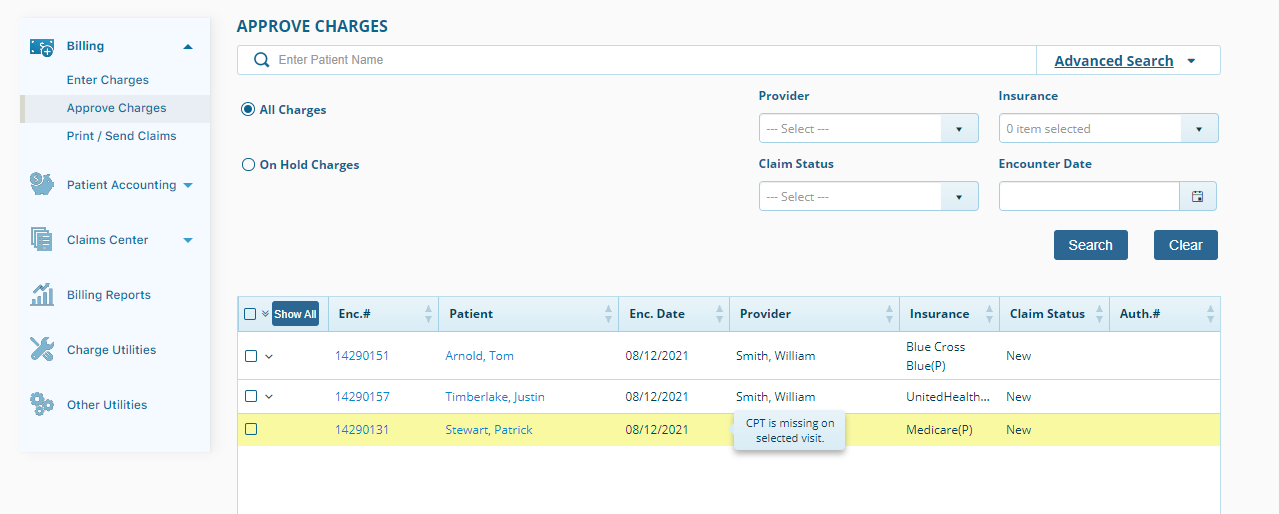
A yellow highlighted line in Approve Charges indicates that there is missing data for the encounter.
ChiroFusion Support
Updated Sep 12, 2024
The system will display further information on the missing data when you hover over the charge. The yellow line will disappear once the claim has been updated to include the missing data.
Your feedback helps us continuously improve our documentation.
Medicare coverage of chiropractic services may require the use of specific modifier codes.
This article covers the specific settings required for Assignment of Benefits to ensure that insurance payments are issued directly to the Provider or Facility (as opposed to the patient).
This article covers the steps required to convert and insured patient to self-pay.
Medicare has specific requirements for how they want claims submitted on the HCFA 1500 Claims forms. Below we have outlined the areas where you can enter the necessary information to satisfy these Medicare specific requirements.