
ChiroFusion’s MailMyStatements™ integration allows you to easily send your patient statement file electronically and they will print and mail the statements to your patients. This is a great way to streamline your healthcare billing process and reduce overhead printing/mailing costs while improving payment turnaround time.
Step 1: Complete this inquiry form & a MailMyStatements™ representative will reach out to you to discuss any questions you may have & to provide you with pricing details.
Step 2: Once your MailMyStatements™ account is set up, they will provide you with a set of SFTP credentials (username + password). You will then input these credentials into your ChiroFusion Admin account under the Utilities tab.
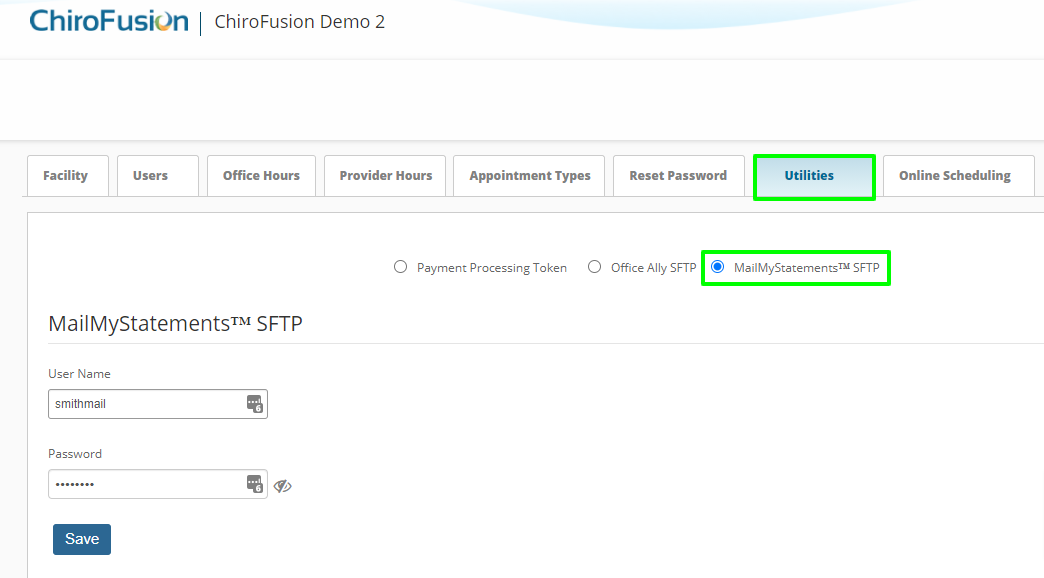
Step 3: Start sending patient statement files directly from your ChiroFusion account
There is no need to log into your MailMyStatements™ account directly as everything is managed within your ChiroFusion account. Any direct management of statements in your MMS account will disrupt the chain of flow and not reflect correctly in your ChiroFusion account. The only reason you may need to login to this account is if you are managing your billing options/invoices.