
ChiroFusion logo
Back to Knowledge Base
Tips & Tools

How to create an email automation for patient birthdays

This article describes the steps involved to setup an automated email birthday campaign for your patients using Mailchimp.

C

ChiroFusion Support

Updated Sep 12, 2024

780 views

As a doctor in private practice, you know how difficult it can be to attract new referrals. It doesn't have to be! It only takes a few minutes to create a lasting impression. 

In this blog post, we reveal how saying, "Happy Birthday" can easily generate new referrals to your practice and increase profits. Please check it out when you have some time available.

Once you have exported your patient list to an .xls file, it can be managed in Microsoft Excel or Google Sheets and used for anything from creating automated emailing lists to a backup of your patient demographic.


The Patient List has been relocated from the Settings icon to the Run Reports module. To export patient demographics, go to Schedule > Run Reports > Patient Reports > Patient List
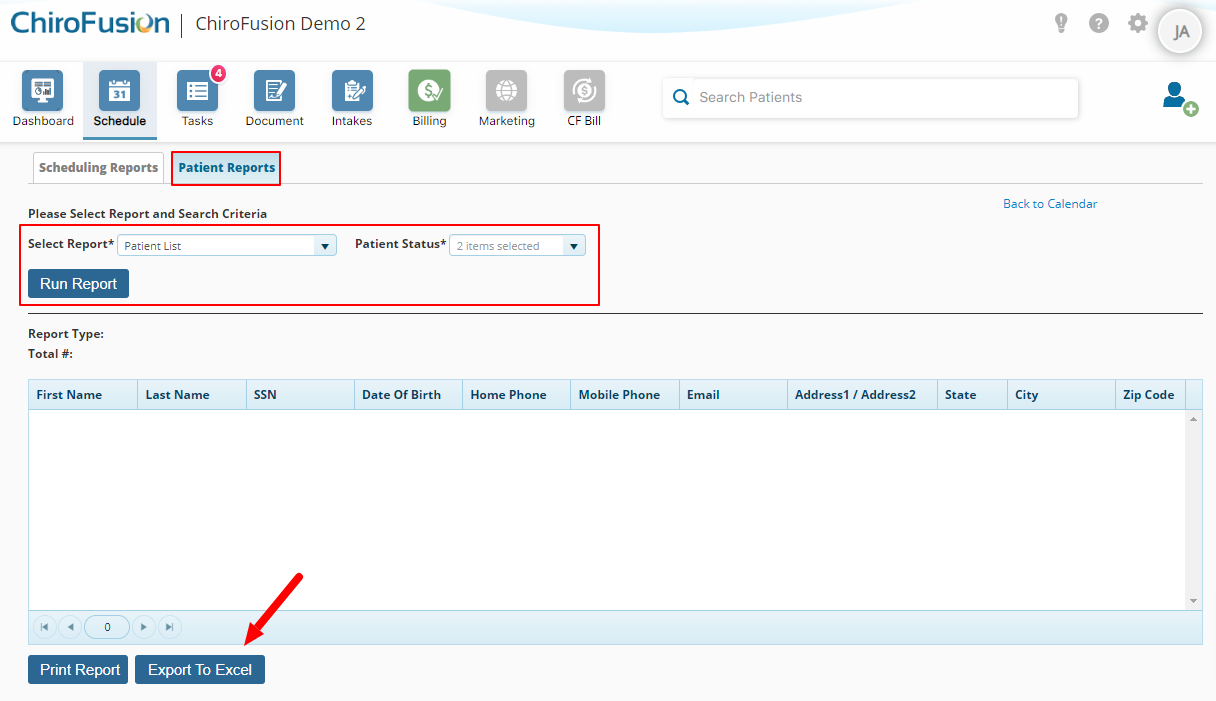
 

image-png-1


Was this article helpful?

Your feedback helps us continuously improve our documentation.

Related Articles

Tips & Tools

Using Google Translate for Intakes: A Step-by-Step Guide

This article will discuss how to turn on Google Translate, for translating online intakes into any language you prefer.

Tips & Tools

How do I enable voice dictation?

Voice dictation converts spoken words into text and can help to improve speed and efficiency when documenting.

Tips & Tools

How do I export patient data and medical records from ChiroFusion?

You have the ability to export your patient data and medical records from your ChiroFusion account.

Tips & Tools

ICD-10 cheat sheet for chiropractors

Our ICD-10 cheat sheet will help you to submit claims faster and with greater accuracy.