
ChiroFusion logo
Back to Knowledge Base
Patient Profiles

How do I terminate patient insurance?

This article explains how to remove insurance from a patient profile.

C

ChiroFusion Support

Updated Sep 11, 2024

382 views

It is important to terminate old insurance before adding new insurance so you do not have conflicting data on the patient profile. 


Step 1:

Navigate to the Primary (or Secondary) Insurance tab of the patient's profile. 


Step 2:

Input the termination date in the Termination Date field. This should be a date in the past considering you do not want it to appear on future dates of service. Be sure to scroll down to the bottom of the page & save your changes. This now marks the insurance as inactive and it will no longer pull through to billing. 
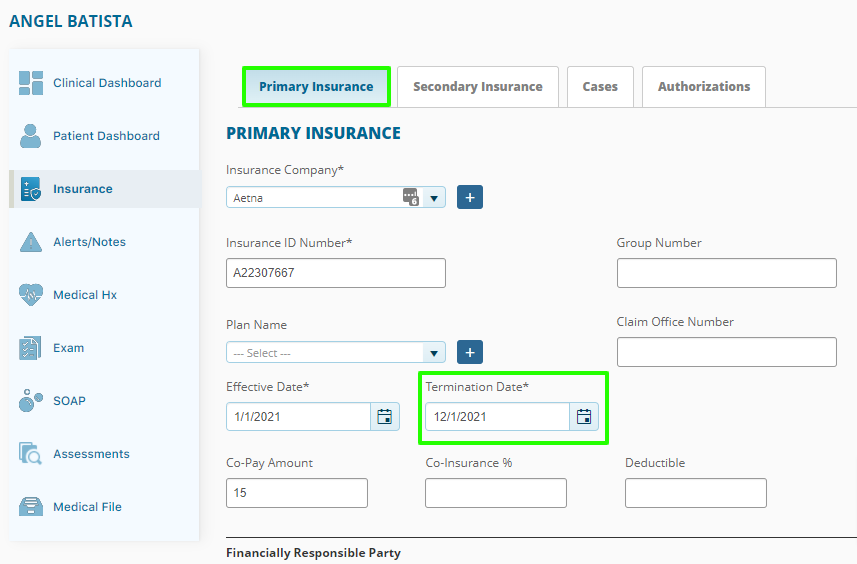
Terminate Insurance


Step 3:

Next, click on the Cases tab and select the corresponding case. In the Primary (or Secondary) Insurance drop-down menu, click the X next to the insurance name to remove it from the case. Click save to update the Case.
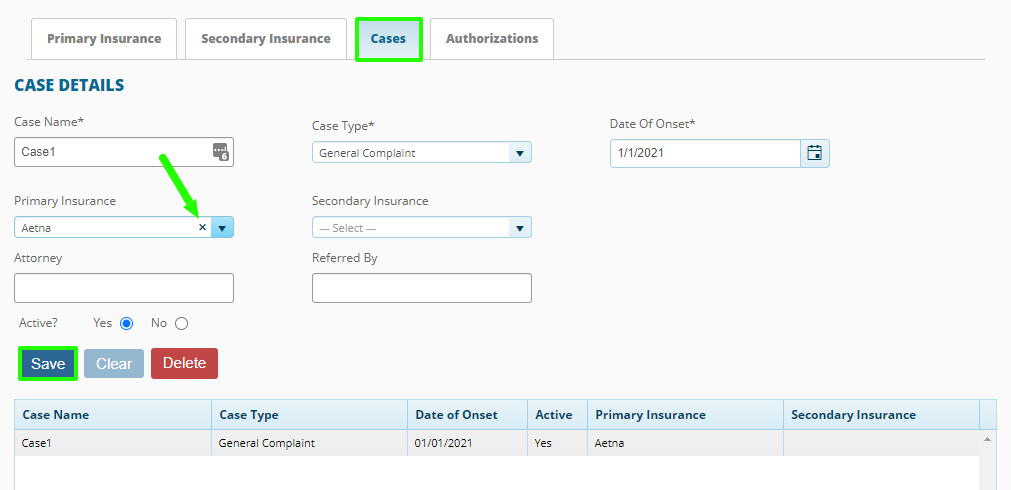
Remove Insurance from Case-1


Tags:#insurance#patient insurance#terminate insurance#remove insurance#delete insurance#primary insurance#cases

Was this article helpful?

Your feedback helps us continuously improve our documentation.

Related Articles

FAQ's

How do we backup our data in ChiroFusion?

There is not currently a way to locally back up files from your ChiroFusion account on your computer. Your data is securely stored on our servers that utilize the highest levels of bank encryption software and are fully redundant.

Patient Profiles

How do I generate a Face Sheet for referrals?

A Face Sheet (also called a demographic page) is a page that can be printed from the system with basic information regarding your patient. This allows for easier transfer of information from one provider to another.

FAQ's

Can I Use Same Email For Parent And Child?

ChiroFusion requires a unique email address to be associated with each patient including minors.