
STEP 1. Contact Office Ally by emailing support@officeally.com or by submitting a contact form here. Copy and paste the message below into your email or form, and fill in your specific account details before sending.
I will be utilizing ChiroFusion as my software.
My Office Ally username is: ENTER USERNAME HERE
I need to set up an SFTP account. Please configure my account for the following:
- Ensure my account is only set up for HCFA 1500 forms.
- 835/277/999 Response Reports: Turn On
- ERA Split Option: Split By Check
STEP 2. Complete the ERA Delivery Change Form
This is required for all new and existing Office Ally clients regardless of whether or not you have already established ERAs or will do so in the future (see below: be sure to enter the username for your Office Ally account in the indicated field). It is very important that you list all NPIs that you bill with.
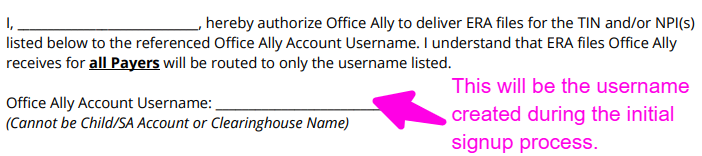
STEP 3. Connect your Office Ally account with ChiroFusion.
Please Note: Office Ally will send you two sets of logins. The one needed for this step is the SFTP Username and Password that they will send to you in two separate emails.
STEP 4. Turn Off DeDuping Filter
If at any point you receive a rejection reason on your claim submission stating, 'Duplicate Claim Within 90 Days' it is due to an Office Ally filter that's meant to block an identical claim from being sent within 90 days of the original claim filed. If you would like to turn this filter off in your Office Ally account, please click here for instructions.
Important Notes
Once the accounts are linked there is no need to log into your separate Office Ally clearinghouse account in order to manage or view your e-claims. All claims management will take place in your ChiroFusion account once you have completed the above step.
All clients utilizing a ChiroFusion account for e-claims must complete this process. This also applies to any client who plans on utilizing e-claims in the future at any time.
*** It is important to complete the above process as soon as possible. You will not be able to file electronic claims through your ChiroFusion account until this entire process is completed and your account is connected ***
Once you have completed all 4 steps you should be good to go! If you have any questions, please contact us at www.chirofusionhelp.com
________________________________________________________________
* Office Ally is a free clearinghouse solution. The only time a cost is associated with Office Ally is when a provider is billing 50% or more claims a month to payers that are non-participating payers. Office Ally offers a full list of these non-par payers. The monthly flat fee is $44.95/month if you are billing 50% or more to Non-Par payers and this invoice is an Office Ally charge that will be billed to you directly and not associated with ChiroFusion.