
ChiroFusion logo
Back to Knowledge Base
Billing & Claims ManagementInsurance Claims & Payer Specific Requirements

How do I attach notes to electronic claims?

This article covers how to attach notes to electronic claims in Office Ally for Auto and Workman's Compensation carriers who require notes to be submitted with claims.

C

ChiroFusion Support

Updated Jun 15, 2026

556 views

Once you have filed an electronic claim in ChiroFusion, you have the ability to log into your Office Ally account and attach a note if the Payer appears on the approved list.


Follow these steps to attach notes to electronic claim files.

  1. File your claim electronically through ChiroFusion and wait until Office Ally processes the claim and assigns it a 10-digit ID number.
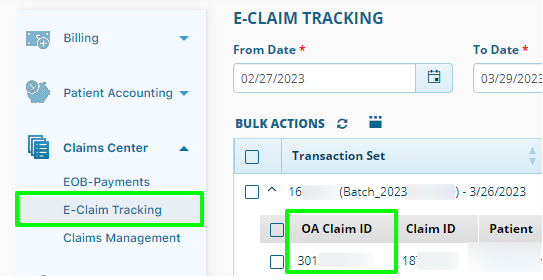
    OA Claim ID (1)

  2. Export your note for the visit from ChiroFusion to your desktop.
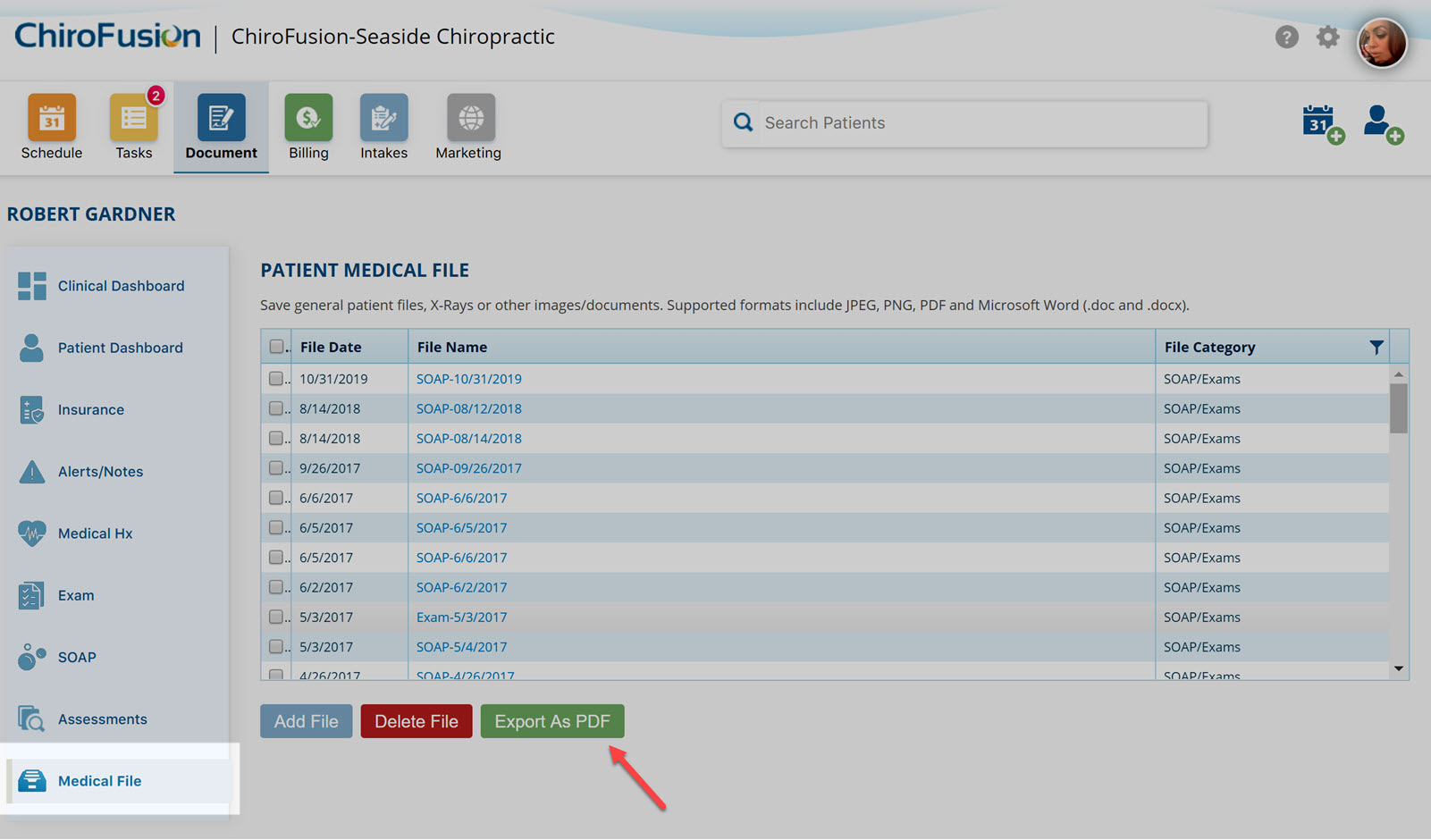
    export records

  3. Log into your Office Ally account and follow these instructions.

Before you can begin utilizing this feature, you must contact Office Ally at (360) 975-7000 and request that the attachments feature be turned on for your account. $0.55 per attachment (confirm pricing directly with Office Ally).


Electronic submission of supporting documentation is predominantly available for Auto and Worker's Compensation Payers. Please contact Office Ally directly to confirm if a specific Payer accepts attachments.


Tags:#office ally#auto claim#worker's compensation#worker's comp#attach notes#attaching notes to claims#exporting notes#attach notes to claims#how do i

Was this article helpful?

Your feedback helps us continuously improve our documentation.

Related Articles

Insurance Claims & Payer Specific Requirements

Medicare AT, GA, GX, GY, and GZ modifier requirements for chiropractic billing

Medicare coverage of chiropractic services may require the use of specific modifier codes.

Insurance Claims & Payer Specific Requirements

How do I ensure that an insurance payment is sent directly to me and not the patient?

This article covers the specific settings required for Assignment of Benefits to ensure that insurance payments are issued directly to the Provider or Facility (as opposed to the patient).

FAQ's

How do I convert an insured patient to self-pay?

This article covers the steps required to convert and insured patient to self-pay.

Insurance Claims & Payer Specific Requirements

Medicare specific requirements for the HCFA 1500 claim form

Medicare has specific requirements for how they want claims submitted on the HCFA 1500 Claims forms. Below we have outlined the areas where you can enter the necessary information to satisfy these Medicare specific requirements.