
Batch Status Update
Once a batch is filed it will initially appear as 'Awaiting' until Office Ally processes receipt. You will also receive updates as the payers receive claims as well. Below are the status types and meanings:
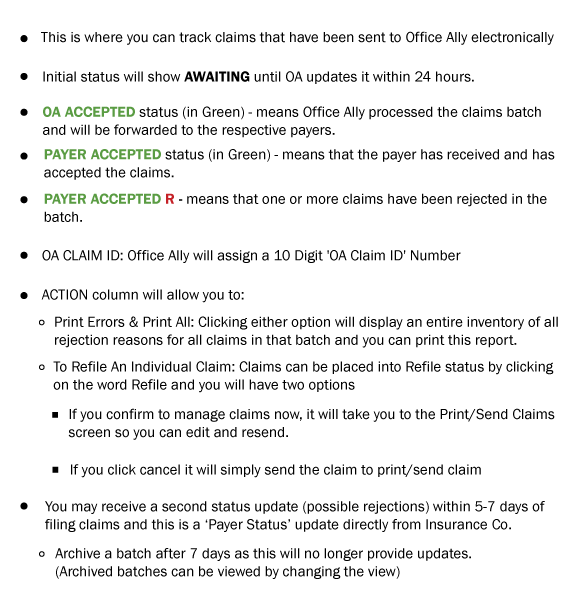
If a batch status remains in 'AWAITING' status for over 72 hours, this may be an indication that your Office Ally requires attention. See below.
- If the SFTP credentials for your Office Ally account have been changed in your ChiroFusion Admin account under Utilities, then it would affect the connection.
- There could be a connection disruption on Office Ally's end which could be the result of an issue with your Office Ally account (unpaid invoice, too many failed access attempts, etc.).
- Confirm that your SFTP credentials have not been changed in the ChiroFusion Admin account under Utilities. You should have received two SFTP emails from Office Ally when your account was set up. These emails contain your username and password. If you cannot locate these emails and need to verify, please contact Office Ally directly to obtain this info at (360) 975-7000 (Option 1).
- Contact Office Ally to see if your account has been paused for an unknown reason.
Once the connection issue has been resolved, your claims will automatically transmit to Office Ally and their status will update.
Claims Status Update
Within each batch, individual claims will be assigned an 'OA Claim ID' number from Office Ally, which can be referenced when following up with Office Ally to inquire about claims.
You may also receive individual claims updates as payers receive claims. They will appear under 'Print' and show any rejections and print errors.
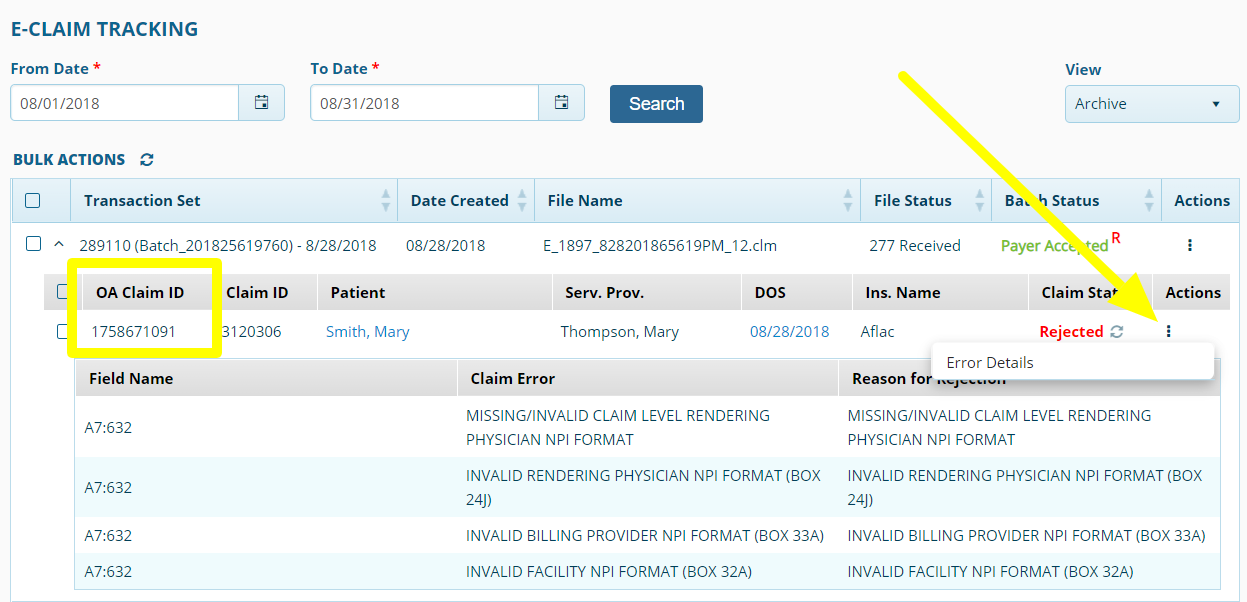
These updates will only take place for up to 7 days, after which time you will receive further updates via EOB/ERA.